
Rugged Mobile Computer Battery Management: Why Most Warehouses Are Losing Productivity and Don't Know It
Posted by Midwest Barcoding Solutions on May 21st 2026

By Midwest Barcoding Solutions | Mobile Device Fleet Management | Battery Management Guide
Every rechargeable lithium-ion battery loses capacity over time. This is not a defect and it is not preventable — it is chemistry. Each charge cycle permanently reduces the battery's maximum capacity by a small percentage. A new battery that holds a full shift charge at 100 percent of its rated capacity will hold 90 percent of that capacity after several hundred cycles, and 80 percent after several hundred more. The degradation is gradual and invisible. The device powers on, the battery indicator shows a charge level, and nothing tells the worker or the IT manager that the battery can no longer deliver what it once could.
The problem compounds at fleet scale. An operation running 50 mobile computers has 50 batteries degrading at different rates depending on how heavily each device is used, how often each battery is charged, and whether each battery has been stored correctly during idle periods. Without a tool that measures battery health across the fleet, the IT manager has no visibility into which batteries are at 95 percent of original capacity and which are at 72 percent. The 72 percent batteries are the ones failing mid-shift. They are just not being identified until after the failure.
What Battery Degradation Actually Costs
The direct cost of a mid-shift battery failure is the time the worker loses. A device that dies at hour six of an eight-hour shift requires the worker to find a charging station, wait for enough charge to resume work, or find a spare device and re-establish their WMS session. In a pick-and-pack environment, that is 15 to 30 minutes of downtime per event. At a rate of one mid-shift failure per week per degraded battery, across a fleet where 20 percent of batteries are significantly degraded, the downtime accumulates to a measurable number of hours per week that is directly attributable to battery health rather than to device problems, network issues, or operator behavior.
The indirect costs are larger and less visible. A worker who experiences regular mid-shift failures adopts compensating behaviors: carrying the device to a charging station during breaks, being more conservative about device usage, or checking charge level frequently and seeking a charged device before the end of shift even if the current device has some charge remaining. These behaviors reduce productivity and create unpredictable device usage patterns that make shift-change charging planning less reliable.
The WMS data integrity cost is the one most operations miss entirely. A device that drops a WMS session mid-transaction may or may not resume the transaction correctly when it reconnects. Depending on how the WMS handles interrupted sessions, the result can be a transaction that was partially recorded, a duplicate record, or a missed scan that does not appear in the inventory record. These data quality events are difficult to trace back to battery failures because no error is logged at the WMS level — the session just ended.
Zebra field data from operations that have deployed battery monitoring consistently shows that unmanaged fleets are running 15 to 25 percent of their batteries at significantly degraded capacity at any given time. For a fleet of 50 mobile computers, that is 8 to 13 devices whose batteries can no longer hold a full shift charge. Those devices are not failing — they are producing intermittent, hard-to-diagnose downtime events that accumulate invisibly across every shift.

How PowerPrecision and PowerPrecision+ Make the Invisible Visible
Zebra's PowerPrecision and PowerPrecision+ battery technology addresses the invisible degradation problem by reporting battery intelligence to the host device and, through Zebra's software tools, to fleet management dashboards accessible to IT managers.
Every PowerPrecision+ battery reports two critical metrics in real time: State of Charge and State of Health. State of Charge is the familiar percentage of current charge remaining — the number the worker sees on the device display. State of Health is the metric that most fleets never see: the battery's remaining maximum capacity expressed as a percentage of its original rated capacity. A battery at 100 percent State of Charge but 74 percent State of Health will run for 74 percent of the shift duration that the same battery delivered when it was new. The worker's device says it is fully charged. The battery cannot deliver a full shift.
PowerPrecision+ batteries also track the number of charge cycles the battery has completed, the date of manufacture, and additional health indicators that allow Zebra's battery management software to predict the battery's remaining useful life before it fails rather than after. This predictive data is the foundation of proactive battery management — replacing batteries before they fail mid-shift rather than in response to mid-shift failures.
The original PowerPrecision (without the Plus) reports State of Charge and basic health data but does not include the BLE beacon that PowerPrecision+ adds. The BLE beacon in PowerPrecision+ batteries enables location tracking of the battery independently of whether the device is powered on, which supports asset tracking and theft prevention in addition to health monitoring. For new device deployments, specifying PowerPrecision+ is the correct choice. For existing fleets with older PowerPrecision batteries, the health monitoring capability is still available through the device connection.
The PowerPrecision Console: Fleet Battery Health at a Glance
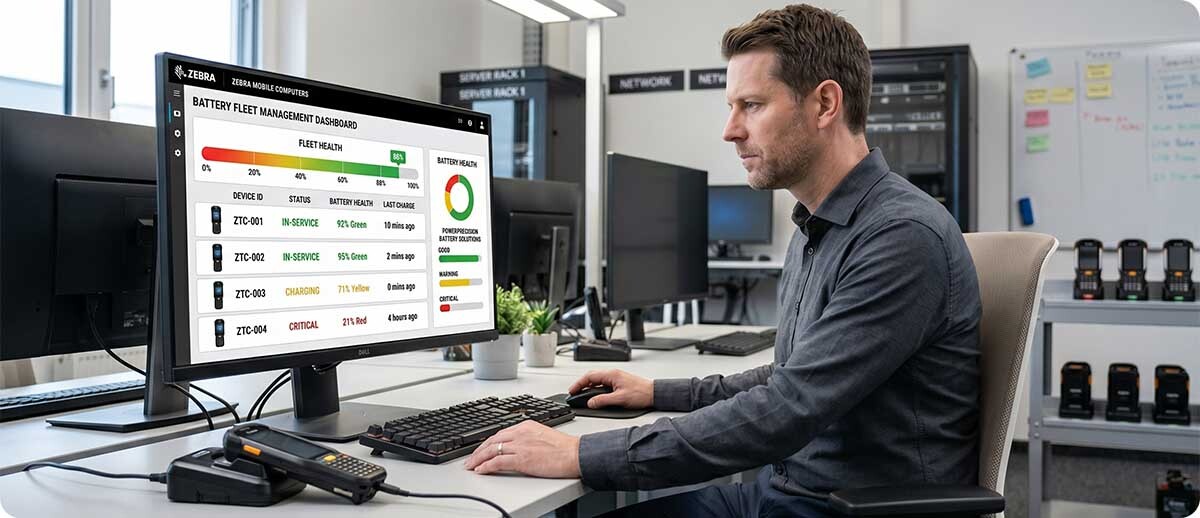
Zebra's PowerPrecision Console is a free cloud-based tool included with Zebra Mobility DNA that aggregates battery health data across the entire fleet and presents it in a dashboard format accessible to IT managers without requiring device-by-device inspection. The console shows State of Health for every battery in the fleet, flags batteries that have fallen below defined health thresholds, and allows IT managers to identify the specific devices carrying degraded batteries before those batteries fail in production.
The practical workflow that PowerPrecision Console enables is straightforward. The IT manager sets a replacement threshold — for example, any battery below 80 percent State of Health goes on the replacement list. The console identifies every battery in the fleet below that threshold. The IT manager schedules replacement during planned maintenance windows rather than responding to mid-shift failures. Workers stop experiencing mid-shift failures because degraded batteries are replaced before they reach the failure point. The downtime cost of reactive battery management is replaced by the predictable, lower cost of proactive replacement.
PowerPrecision Console also supports shift-level battery management. By monitoring State of Charge across all batteries at shift-change time, the console shows whether sufficient fully charged batteries are available for the incoming shift. Operations that run multiple shifts without adequate spare battery inventory — meaning workers start shifts on partially depleted batteries rather than fully charged ones — can identify and address the shortage before it affects productivity rather than discovering it when the second-shift pick rate drops below target.
The Five Battery Management Practices That Eliminate Mid-Shift Failures
1. Set a State of Health replacement threshold and enforce it.
Define the minimum acceptable State of Health for batteries in active production use. 80 percent is a common threshold — below that level, a battery rated for a 10-hour shift can only reliably deliver 8 hours, which may not cover extended shifts or high-usage days. Use PowerPrecision Console to identify every battery below the threshold and schedule replacement during planned maintenance windows rather than waiting for failures to occur in production.
2. Maintain adequate spare battery inventory for each shift.
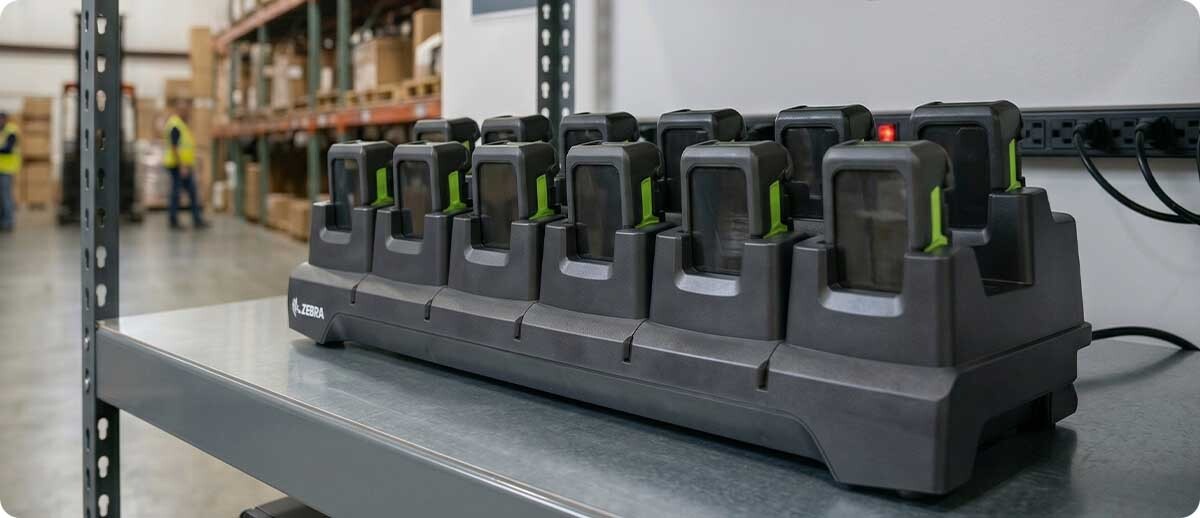
Every mobile computer in active use should have at least one spare battery available for hot swap at shift change. Operations that run lean on spare battery inventory force workers to start shifts on partially depleted batteries or to wait for devices to charge rather than starting work. Calculate spare battery inventory as the number of active devices multiplied by the number of shifts, minus any batteries that are charging during active production time.
3. Use hot swap rather than device charging wherever possible.
Putting a device in a charging cradle during a shift means that device is unavailable to the worker while it charges. Swapping a depleted battery for a charged spare takes under 60 seconds on most Zebra TC and MC devices and returns the device to full operation immediately. Hot swap requires adequate spare battery inventory but eliminates the device downtime that cradle-charging during shifts creates. Designing the charging infrastructure around battery swap rather than device charging produces better operational outcomes for multi-shift operations.
4. Do not store batteries fully charged for extended periods.
Lithium-ion batteries stored at full charge for extended periods — weeks or months — degrade faster than batteries stored at 40 to 60 percent charge. Operations that keep a large pool of fully charged spare batteries sitting on shelves between deployments accelerate the degradation of those batteries. The correct practice for spare batteries not in active rotation is to store them at a partial charge and bring them to full charge only when they are entering active use.
5. Track battery age alongside State of Health.
PowerPrecision+ batteries report their manufacture date. A battery that is three years old and at 85 percent State of Health will reach the replacement threshold within months and should be scheduled for replacement in the next maintenance cycle. A battery that is one year old and at 85 percent State of Health may indicate abnormal usage patterns or a charging infrastructure problem rather than normal degradation. Age data combined with health data provides a more complete picture than health data alone.
Frequently Asked Questions: Mobile Computer Battery Management
How do I check battery State of Health without the PowerPrecision Console?
On any Zebra device running Mobility DNA, the Battery Manager application on the device displays State of Health for the installed PowerPrecision or PowerPrecision+ battery. Navigate to the Battery Manager app and the health percentage is displayed alongside State of Charge. This works for checking individual devices but does not scale to fleet-level visibility — for a fleet of 20 or more devices, PowerPrecision Console is the right tool because it aggregates data across all devices without requiring individual device inspection.
We run two shifts. How many spare batteries do we need per device?
For a two-shift operation using hot swap, the standard recommendation is two spare batteries per active device — one in the device during shift one, one charged and ready for shift two, and the depleted battery from shift one charging during shift two for use in shift one the following day. This assumes standard shift lengths within the battery's rated capacity at current State of Health. If your batteries are significantly degraded, a third spare per device may be necessary to cover both shifts reliably until replacement batteries are deployed. PowerPrecision Console's shift-readiness view shows whether you have sufficient charged batteries for the incoming shift before that shift starts.
Our devices are three years old. Should we replace the batteries or the devices?
This depends on the State of Health of the batteries and the condition of the devices themselves. If the devices are functioning well and the primary complaint is shift-length battery life, replacing the batteries is the correct and significantly less expensive solution. A fleet of 50 devices with new batteries at $80 to $120 per battery is a $4,000 to $6,000 investment that extends the fleet's productive life by two to three years. If the devices themselves are experiencing performance problems — slow WMS response, connectivity issues, display wear — the device replacement conversation is more appropriate. PowerPrecision Console's State of Health data is the right input to this decision: if batteries across the fleet are averaging below 75 percent State of Health and the devices are otherwise performing well, battery replacement is the answer.
Do third-party batteries work with PowerPrecision Console?
No. PowerPrecision Console and the Battery Manager application on Zebra devices only communicate with genuine Zebra PowerPrecision and PowerPrecision+ batteries. Third-party batteries that physically fit a Zebra device may power the device but do not report State of Health, State of Charge, cycle count, or manufacture date to Zebra's monitoring tools. An operation running third-party batteries has no visibility into fleet battery health beyond what workers report anecdotally. For operations that want the productivity benefits of proactive battery management, genuine Zebra PowerPrecision+ batteries are a requirement of the system, not an optional upgrade.
If you are not sure how many batteries in your current fleet are below the replacement threshold, or if you want to evaluate the right spare battery and charging infrastructure for your shift structure and device mix, our team can help you run through the numbers. We carry the full Zebra PowerPrecision+ battery and charging cradle lineup across TC and MC platforms and can put together a battery management configuration that fits your operation. Fill out the form below and let us help you eliminate mid-shift failures before the next shift starts.