
Wearable Scanners in the Warehouse: When Ring Scanners and Wrist-Worn Computers Beat a Handheld
Posted by Midwest Barcoding Solutions on Apr 27th 2026
By Midwest Barcoding Solutions | Wearable Scanners | Hands-Free Scanning Buyer's Guide
Wearable scanning gets discussed in two ways: as a general category benefit ("hands-free is more efficient") and as a specific buying decision ("which device, which configuration, paired with what"). The general case is easy to make. The specific case — which workflow earns the productivity improvement, how ring scanners and wrist computers pair together, what wearing style works for what task, and when a handheld is still the better tool,requires more precision.
This guide covers the Zebra RS6100 ring scanner and WT6300 wrist-worn computer specifically: the full specification, the five wearing styles of the RS6100, the RS6100 + WT6300 pairing architecture, the workflows where wearable scanning delivers a clear productivity advantage, and the scenarios where a handheld remains the right call. If you're evaluating a wearable deployment or upgrading an existing RS5100 or RS6000 fleet, this is the decision map.
The Zebra RS6100: What Changed from RS6000
The RS6100 is Zebra's current flagship ring scanner, replacing the RS6000 as the top of the wearable scanner line. The headline improvements are physical and functional: the RS6100 is less than half the size and weight of the RS6000, just over two ounces and roughly two cubic inches, which matters for workers wearing it through an entire shift. A scanner you don't notice on your hand is a scanner workers will actually use correctly.
The scan engine is also a step up. The RS6100 carries the SE55 1D/2D Advanced Range Scan Engine with IntelliFocus technology, the same engine family in Zebra's MC9400 mobile computer. Capture range: 2 inches to 40 feet. That means the same ring scanner that reads a label in-hand at a pick location also reads a rack label at the top of a 35-foot bay, without switching modes or changing devices. For high-bay picking operations, this eliminates the workflow split that previously required a separate extended-range device for the upper racks.
The modular two-piece design is a significant operational improvement over previous-generation ring scanners. The trigger assembly physically separates from the scanner body — and since only the trigger assembly contacts the worker's skin, each worker can have their own personal trigger while sharing the scanner body. This simplifies hygiene management and reduces shared-device concerns in multi-shift environments. Both the trigger assembly and the battery are field-swappable without tools, which means the RS6100 can be serviced on-site, no depot return for a trigger replacement or a battery swap.
The Five RS6100 Wearing Styles — Which One for Which Workflow
Five interchangeable wearing styles is one of the RS6100's most operationally significant features and it's also one of the most underused. Most operations deploy ring scanners in a single wearing configuration fleet-wide, then deal with worker ergonomic complaints that are really just a mismatch between the wearing style and the task. All five mounts are interchangeable and can be swapped at any time, meaning you can configure different styles for different zones or workflows within the same fleet.
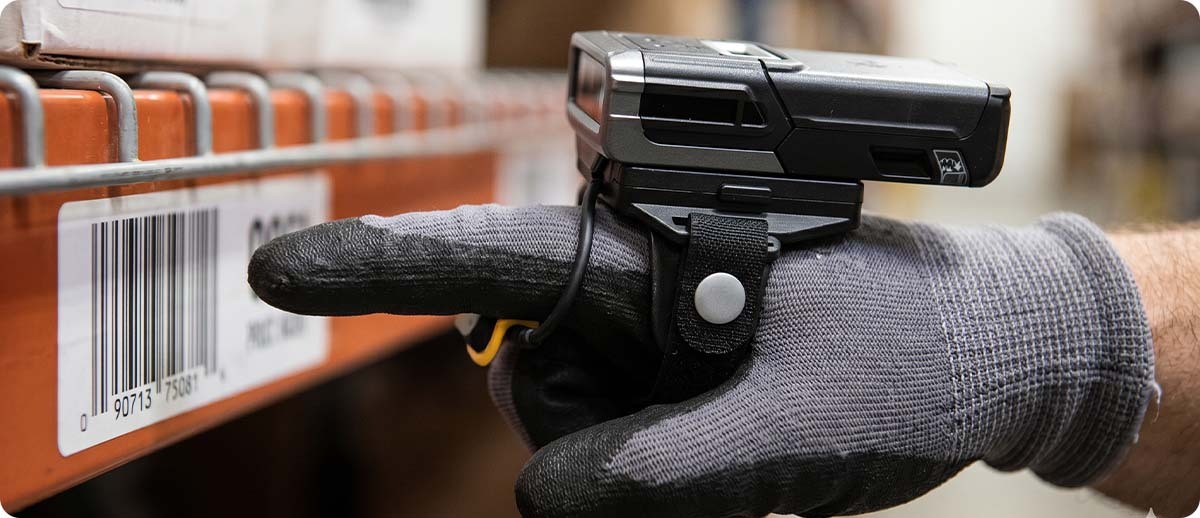
Enterprise Hand Mount (finger-worn with hand strap): The most common configuration for high-cycle picking. The scanner sits on the back of the hand, trigger extends to the index finger. Leaves both hands free to handle items while the trigger fires with a natural index-finger curl. Best for: pick-and-pack operations, conveyor sorting, high-frequency scan cycles where both hands are regularly in use. This is the RS61B0-KBENZWR configuration on the MBS site.
Back of Hand Mount: The scanner body mounts on the back of the hand via a hand strap without the finger loop. Slightly lower profile than the Enterprise Hand Mount. Best for: workers who need to put their hands into tight spaces or containers, where a finger-loop trigger would create interference.
Wrist Mount: Scanner sits on the forearm above the wrist, trigger extends down to the hand. Completely clears the fingers and palm — both hands are entirely free for handling large or heavy items. Best for: receiving operations, put-away with large cartons, any workflow where workers need full finger and palm clearance to handle bulky items between scans.
Lanyard Mount: The RS6100 hangs at the hip or chest on a lanyard, pulled up and pointed to scan. Best for: forklift operators and vehicle-mounted workers who scan infrequently but don't want to reach for a dedicated scanner or holster a handheld device. The lanyard keeps the scanner accessible without occupying a bracket or a hand.
Double Trigger Configuration: Available on extended-battery models (RS61B0-KESSXWR), adds a second trigger button for workers who need to switch trigger hands mid-shift or who prefer two-handed scanning ergonomics for specific tasks.
RS6100 Battery Options and Freezer Configuration
The RS6100 is a hot-swap battery device with no need to power down to change the battery. Matched to shift length, there are three battery options:
Standard 480 mAh: Rated for a full shift at high scan rates. 0°C to +50°C operating temperature. For standard warehouse and distribution applications in climate-controlled environments. Models: RS61B0-KBENZWR (Enterprise Hand Mount), RS61B0-KBSSZWR (single trigger).
Extended 735 mAh: For longer shifts or double-shift deployments. -30°C to +50°C operating temperature. The extended battery's cold resistance qualification makes it the correct specification for operations that include some freezer or outdoor cold-weather exposure as part of the workflow. Models: RS61B0-KESSXWR (single trigger), double-trigger extended configurations.
Freezer 660 mAh (Cold Storage): Specifically engineered for sustained freezer operation from -30°C to +50°C (-22°F to +122°F). The cold storage configuration (RS61B0-KFSSYWR) is the correct specification for dedicated freezer workers who are in and out of -20°F environments continuously. The standard battery's cold resistance floor is 0°C running a standard battery in a -20°F freezer continuously will result in battery performance and life degradation over time. The freezer battery is the right call when workers spend the majority of their shift inside temperature-controlled cold storage.
PowerPrecision+ battery intelligence reports state of health in real time to the host device, the WT6300 or paired mobile computer running PowerPrecision Console can identify batteries that can no longer hold a full charge before they fail mid-shift. High-capacity ShareCradles charge 20 RS6100 scanners or 40 batteries per cradle, so a fleet of 100 scanners requires only five cradles instead of 100 USB charging cables.
The WT6300 Wrist-Worn Computer — The RS6100's Host Device
The RS6100 is a scanner, not a computer, it reads barcodes and transmits data, but it doesn't run WMS software or display pick instructions. It needs a host device. That host is most often the Zebra WT6300, the wrist-mounted Android computer that pairs with the RS6100 to create a complete hands-free picking system.
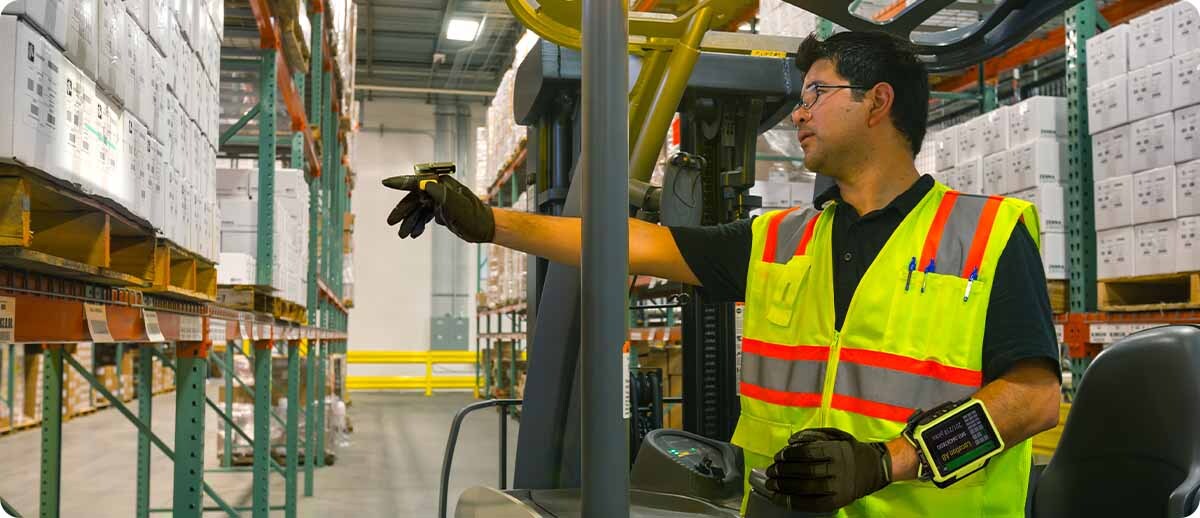
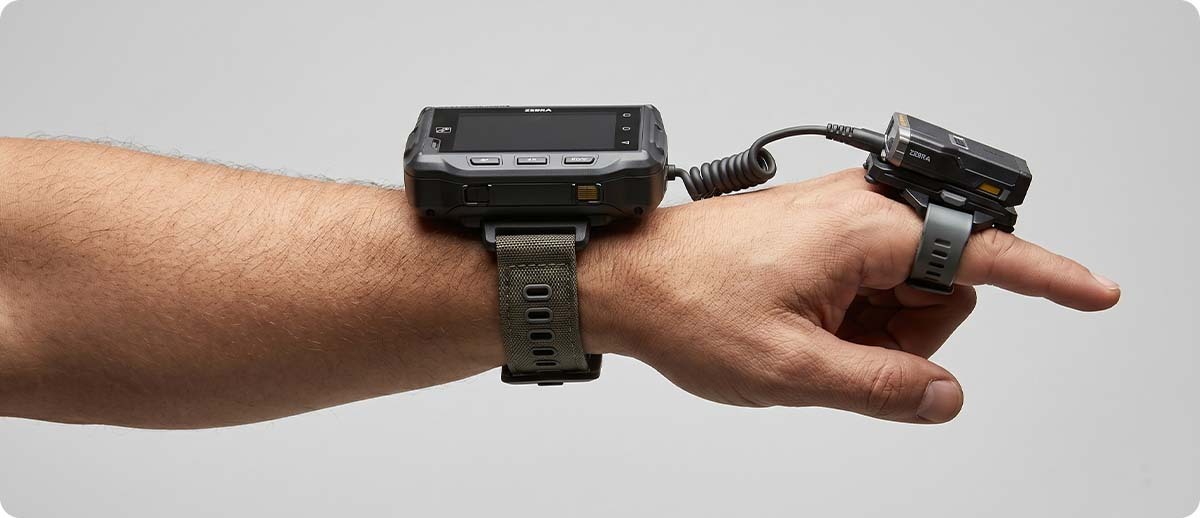
The WT6300 straps to the forearm above the wrist. The RS6100 mounts on the hand below it. The worker's eyes read pick instructions on the WT6300's display. The RS6100 fires to capture the scan. Both hands remain free to handle product between scan events. This is the full wearable architecture, one device handles compute and display, one device handles scan capture, both worn on the body without occupying either hand.
The WT6300 is available in two configurations on the MBS site:
WT63B0-KS0QNENA (standard, no keypad): Touch-only interface. For operations where all WMS interaction is touch-based — confirming picks, navigating prompts, acknowledging exceptions. The no-keypad version is lighter and lower-profile on the forearm.
WT63B0-KX0QNENA (with keypad): Adds a physical keypad for workers who need to enter quantities, serial numbers, lot numbers, or exception codes manually as part of the picking workflow. The keypad is particularly valuable in operations running terminal emulation where the WMS interface requires keyboard input for certain transactions.
The RS6100 connects to the WT6300 via Bluetooth (cordless) or via a corded adapter, the corded option eliminates the need for the RS6100's battery entirely, drawing power from the WT6300. For deployments where battery management is a constraint or where continuous operation without battery monitoring is preferred, the corded RS6100 + WT6300 configuration is operationally simpler: one device to charge per worker rather than two.
Zebra RS6100 — Ring Scanner Product Line at MBS
RS61B0-KBENZWR | SE55, standard 480mAh, Enterprise Hand Mount, 0°C to +50°C
RS61B0-KBSSZWR | SE55, standard 480mAh, single trigger, worldwide
RS61B0-KESSXWR | SE55, extended 735mAh, single trigger, -30°C to +50°C
RS61B0-KNNTZWR | SE55, additional configuration
RS61B0-KFSSYWR | SE55, freezer 660mAh, single trigger, -30°C to +50°C (Cold Storage)
Shop Zebra RS6100 →Zebra WT6300 — Wrist-Worn Computer at MBS
WT63B0-KS0QNENA | Android wrist computer, no keypad, touch interface
WT63B0-KX0QNENA | Android wrist computer, with keypad, touch + manual entry
Shop Zebra WT6300 →
Where Wearable Scanning Beats a Handheld: Workflow by Workflow
High-Cycle Picking and Put-Away
This is the core use case where wearable scanning consistently wins. A picker making 300-500 picks per shift with a handheld sets the device down and picks it up with every pick event or scans one-handed while struggling to handle product with the other. With the RS6100 in Enterprise Hand Mount configuration paired to the WT6300, the scan trigger is an index-finger curl. Both hands move product. The scanner fires without interrupting the physical workflow.
Industry studies on pick-and-pack operations consistently show 10-15% throughput improvement when moving from handheld to wearable scanning in high-cycle picking environments. At 400 picks per shift, that's 40-60 additional picks per worker per shift. Across a team of 20 pickers over 250 days, that's 200,000-300,000 additional picks per year without adding headcount.
Receiving and Inbound Verification
Inbound receiving involves handling cases, verifying labels, and moving product from the dock to staging, all while scanning. A handheld in this environment either gets set on a surface (where it becomes a hazard and a hygiene concern) or gets tucked under an arm between scans. With the RS6100 in wrist mount configuration, the scanner is entirely out of the way of the hands and palms, which are needed to handle large, heavy cartons. Workers scan arriving cases without breaking the handling workflow.
The RS6100's SE55 scan engine also reads damaged, scratched, dirty, and shrink-wrapped barcodes that a standard-range ring scanner often fails on, a meaningful operational advantage at receiving, where inbound label quality is outside the operation's control.
High-Bay Racking — Vertical Scan Range
The RS6100's 40-foot scan range is unusual for a ring scanner. Most ring scanners are short-range, capable at arm's length but not designed for elevated rack labels. The RS6100's SE55 engine changes this: it can read location labels at the top of a 30-35 foot rack from the floor without switching to an extended-range handheld. For operations with high-bay racking where workers verify put-away locations by scanning the location label overhead, the RS6100 eliminates the device swap that a shorter-range wearable would require.
Forklift and Vehicle-Mounted Operations
Forklift operators using a vehicle-mounted computer (VC8300) can pair an RS6100 in lanyard configuration via Bluetooth. The RS6100 hangs accessible at the hip or chest, pulled up and pointed to scan a pallet or rack label when needed, then released. This keeps the operator's hands on the controls between scans rather than reaching for a dedicated tethered scanner. For operations with mixed forklift and pedestrian picking workflows, a Bluetooth-paired RS6100 can roam with the operator regardless of whether they're on the vehicle or on foot.
Cold Storage and Freezer Environments
Handling a handheld while wearing insulated gloves in a -20°F freezer is an ergonomic mismatch. The RS6100 cold storage configuration (RS61B0-KFSSYWR) with 660mAh freezer battery is specifically designed for sustained subzero operation, rated to -30°C/-22°F. Workers in insulated gloves can trigger the ring scanner with a finger curl that's compatible with thick glove materials, the same motion they use to handle product. The corded WT6300 + RS6100 configuration eliminates the need to manage two batteries in a cold environment, which is a meaningful operational simplification for freezer deployments.
Where a Handheld Still Wins
Wearable scanning is not the right answer for every workflow, and deploying it indiscriminately produces a worse result than a well-configured handheld deployment.
Low-frequency scanning with heavy data entry. If a worker spends most of their time typing lot numbers, serial numbers, or exception codes rather than scanning, the WT6300's small wrist-mounted display and the keypad version's limited keyboard are ergonomic liabilities. A TC73 or TC53 with a full keypad and a 6-inch display is a better tool for data-entry-heavy workflows, even if those workflows include occasional scanning.
Extended-range scanning as the primary task. If the primary workflow requires consistently scanning barcodes at 60+ feet, deep high-bay racking, outdoor container yards, the RS6100's 40-foot range, while exceptional for a ring scanner, may not cover the full required distance. In those environments, an MC9400 with SE58 (100+ foot range) is the right platform.
Low-volume or intermittent scanning. If workers scan fewer than 100-150 items per shift, the productivity gain from wearable scanning doesn't accumulate enough to justify the higher device cost and the ergonomic adjustment period. A standard handheld scanner or mobile computer is the more cost-effective choice at low scan volumes.
Workers who resist the form factor. Wearable scanning requires workers to adapt their motion, the trigger isn't where they expect it to be, and the WT6300 display is below their line of sight rather than in front of them. Operations that deploy wearable hardware without adequate training and adjustment time often see workers revert to preferred handheld habits, negating the productivity investment entirely.
Upgrading from RS5100 or RS6000: What Carries Over
For operations currently running RS5100 or RS6000 fleets, the RS6100 upgrade path is designed to minimize accessory write-off. The RS6100 shares trigger assemblies, batteries, and mounts with the RS5100, existing single and double trigger assemblies, standard and extended batteries, Enterprise Hand Mount, Back of Hand Mount, and Lanyard Mount accessories are all compatible with the RS6100. Existing RS5100 8-slot and 40-slot battery chargers also carry forward.
For RS6000 fleets, the accessory compatibility is more limited, the RS6100's smaller physical footprint means a different mount and trigger footprint, but the pairing infrastructure (WT6300, TC-series hosts) carries forward. The RS6100 connects to the same WT6300, TC53, TC73, and vehicle-mounted hosts as the RS6000.
Frequently Asked Questions: RS6100 and WT6300
Can the RS6100 pair with mobile computers other than the WT6300?
Yes. The RS6100 pairs via Bluetooth with any Bluetooth-enabled enterprise mobile computer, TC53, TC73, MC9400, VC8300 vehicle mounts, and others. NFC Tap to Pair is supported on NFC-capable Zebra devices, making pairing a tap rather than a Bluetooth setup sequence. The corded adapter is specific to WT6000, WT6300, TC21/26, and TC53/58, enabling battery-free corded operation on those hosts. For operations that already have a handheld fleet and want to add ring scanner capability to existing devices, the RS6100 Bluetooth pairs to existing infrastructure without requiring a WT6300.
What's the difference between the RS6100 and the RS5100?
The RS6100 carries the SE55 Advanced Range scan engine (2" to 40ft) versus the RS5100's SE4750 standard range engine. The RS6100 is also smaller and lighter than the RS5100, half the size and weight of the RS6000, and meaningfully more compact than the RS5100 as well. The RS6100 also adds NFC Tap to Pair and Bluetooth 5.0 with Wi-Fi Friendly Mode. If your operation's picking workflow requires reading rack labels above standard arm's length, the SE55's extended range is the deciding specification. If your workflow is purely short-range, the RS5100 remains a capable, lower-cost option. RS5100 accessories are forward compatible with the RS6100.
How does the RS6100 handle multi-shift operations with battery swaps?
The RS6100 is a hot-swap battery device — no need to power down or re-pair when swapping batteries. At shift change, a worker pulls the depleted battery and clicks in a charged one. The ShareCradle charges 20 scanners or 40 batteries per unit, so a backroom fleet of 100 scanners charges from five cradles. PowerPrecision+ reports battery state of health to the paired host device, so IT can identify batteries that can no longer power a full shift before they cause mid-shift downtime, not after.
Do we need the WT6300, or can workers use the RS6100 with their existing TC-series handhelds?
If workers already carry TC53 or TC73 devices, the RS6100 can Bluetooth-pair to those handhelds, the handheld remains in a holster while the ring scanner captures barcodes. This is a valid partial-wearable configuration: hands are freer than with a handheld, though the TC device is still holstered on the body rather than wrist-mounted. For pure hands-free operation — both hands completely free for product handling, the WT6300 wrist mount is the right host because it keeps the WMS display on the forearm without requiring the worker to carry or holster a handheld at all.
What does the "Wi-Fi Friendly Mode" on the RS6100 actually do?
In high-device-density warehouse environments, Bluetooth 2.4GHz signals from ring scanners can interfere with Wi-Fi signals on the same frequency band, causing connection drops or reduced Wi-Fi throughput for the host mobile computer. Wi-Fi Friendly Mode on the RS6100 manages the Bluetooth transmission to minimize interference with co-located Wi-Fi traffic on the host device. In facilities with dense scanner deployments, 50 or more Bluetooth ring scanners in a single zone, this mode is a meaningful reliability feature, not just a checkbox spec.
Whether you're deploying a wearable fleet from scratch, evaluating a switch from handheld for a specific workflow, or looking to upgrade an existing RS5100 or RS6000 operation, the RS6100 and WT6300 configuration decisions have more moving parts than the product pages alone cover. Our team has deployed wearable scanning across picking, receiving, put-away, and cold storage environments, and we know which configurations actually hold up shift after shift. Fill out the form below and let's map the right setup for your operation.