
Zebra Rugged Tablets: When a Bigger Screen Makes More Sense Than a Handheld on the Forklift or in the Field
Posted by Midwest Barcoding Solutions on Sep 21st 2026

By Midwest Barcoding Solutions | Rugged Tablets | Tablet vs. Handheld Decision Guide
We sell rugged tablets from Zebra and Honeywell across several tiers. We also sell the handheld mobile computers that most operations reach for first. This guide is for operations that want to understand when the tablet is actually the better tool and when the handheld wins, before committing to a device form factor for a new deployment or an upgrade cycle.
When a Bigger Screen Is the Right Answer
The worker is viewing complex information, not just confirming a scan
A handheld mobile computer with a 5 or 6-inch display is perfectly adequate for scan-confirm workflows where the screen shows a barcode result, a quantity, and a location. It's noticeably inadequate for workflows that involve forms with multiple fields, order details with line item lists, delivery documentation with photos, inspection checklists with several sections, or any application where the worker needs to read and process a meaningful amount of information per interaction.
An 8 or 10-inch tablet display shows the full form, the complete order, the whole checklist in one view without scrolling. For workflows where screen real estate directly affects how quickly and accurately a worker can complete a task, the tablet pays for the form factor premium in time savings per transaction across a full shift.
The device lives on a forklift or vehicle mount rather than in a hand
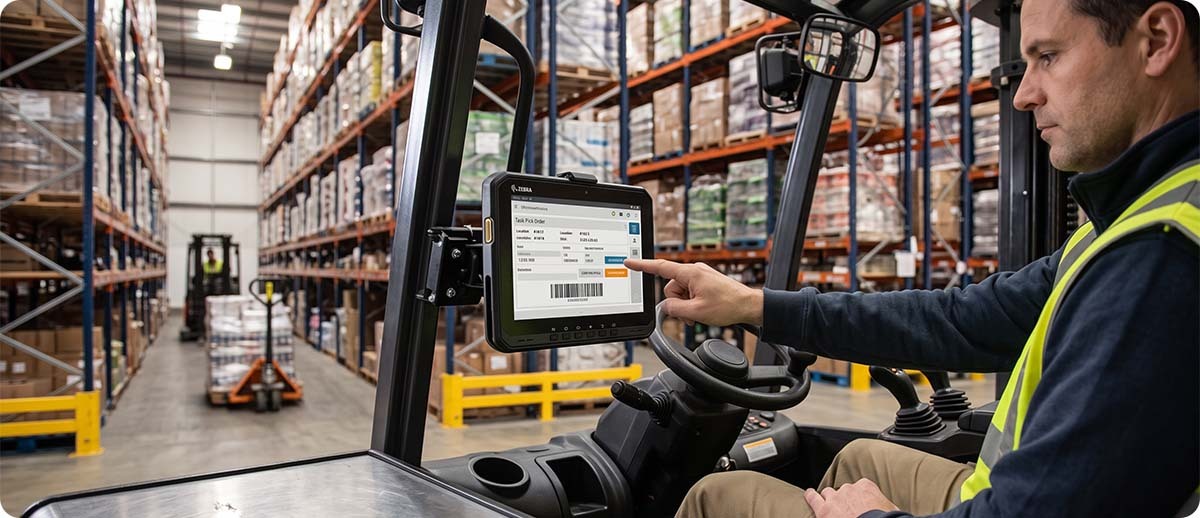
A forklift-mounted computing device is not held by the operator. It's mounted at a fixed position in the cab and viewed from the operator's seat. At that viewing distance, a 6-inch handheld display is too small to be practical. An 8 or 10-inch tablet at the same distance is genuinely usable. Zebra's ET60 and ET65 have a dedicated vehicle mount flyer precisely because vehicle-mounted tablet computing is one of their primary use cases. The tablet is sized and positioned for the operator to interact with from the cab rather than having to dismount or lean forward uncomfortably to see a smaller screen.
The worker needs a Windows application that doesn't have an Android port
Most modern WMS and enterprise applications have Android-compatible versions. Some don't. Legacy enterprise software, specialized manufacturing execution systems, and certain ERP front-ends still require Windows. The Zebra ET60W and ET65W run Windows and run it with AI-enhanced features that improve touchscreen accuracy and audio for frontline worker environments. For operations with a Windows-dependent application stack that needs to go mobile in a rugged environment, the ET60W/ET65W is the path that doesn't require rebuilding the software stack for Android.
A supervisor or team lead needs a shared device for floor management
Supervisors managing a warehouse floor have different device needs than the workers they're overseeing. They're reviewing dashboards, approving exceptions, reassigning tasks, reviewing labor productivity data, and communicating with other managers. These are all applications that benefit from a larger screen and don't require the scan-centric ergonomics of a handheld. A tablet that sits on a desk or mounts to a supervisor station and occasionally goes to the floor is a more natural tool for this role than a handheld that was designed for constant scan-centric use by a floor worker.
The device doubles as a POS or receiving station when docked
Rugged tablets can be docked into desktop configurations that turn the mobile device into a workstation. Zebra's ET51 and ET56 support docking stations and a ShareCradle system that provides full USB, Ethernet, and power connectivity when docked, turning the tablet into a point-of-sale or receiving terminal when at the counter and a mobile device when needed on the floor. For operations that want a single device to serve both stationary and mobile roles without maintaining two separate device types, a tablet with a docking ecosystem covers both.
When a Handheld Still Makes More Sense
The handheld wins when the worker is moving constantly and carrying the device. An 8 or 10-inch tablet worn on a belt or carried in a hand all day is noticeably heavier and more awkward than a TC53 or TC73. For high-volume picking, cycle counting, and receiving workflows where the device is in the worker's hand continuously and the primary interaction is scan-confirm, the handheld's ergonomic profile is a genuine advantage over a tablet. Tablets are for situations where the device is mounted, docked, or set down between uses, not carried all day.
The handheld also wins when scan performance is the primary requirement. Most rugged tablets have a built-in scan engine but it's typically optimized for general-purpose scanning rather than the high-rate, extended-range, or DPM scanning that dedicated handheld scan engines like the SE55 or SE58 provide. If maximum scan performance is the priority, spec a handheld with the right scan engine rather than a tablet with a general-purpose imager.
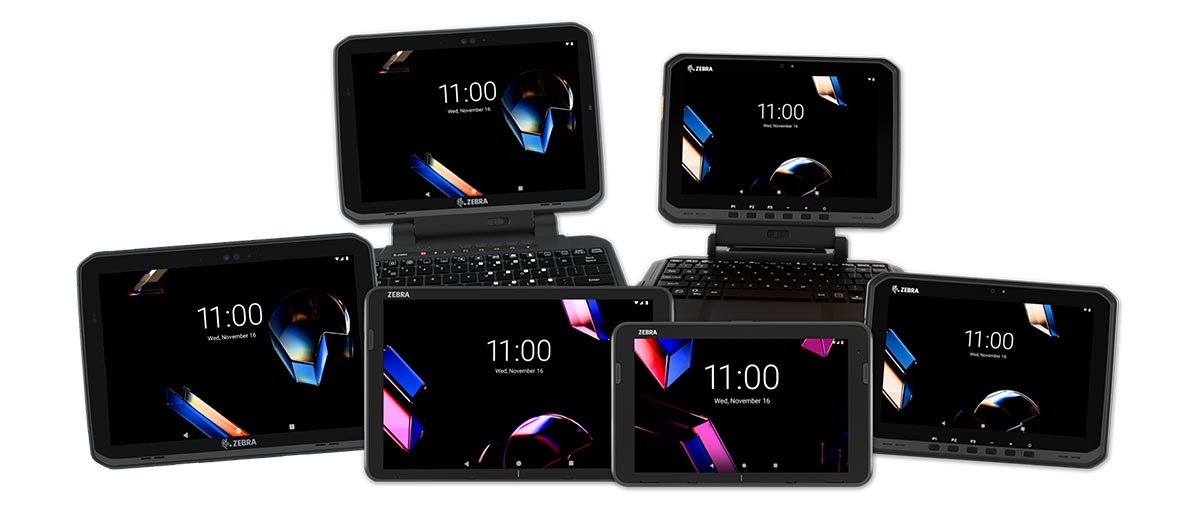
The Rugged Tablet Lineup at MBS
Zebra ET40 and ET45: affordable Android tablets for consumer device replacement
The ET40 (8-inch) and ET45 (10-inch) are Zebra's entry-tier enterprise rugged tablets and the right choice when the primary goal is replacing consumer-grade iPads or Android tablets with a device that's built for the warehouse environment. They're disinfectable, have a built-in scanner, include an emergency alert button, and run Wi-Fi 6 with 5G on the ET45. They're priced to be accessible for large deployments where cost per unit multiplies across the fleet. For field service, light industrial, and retail environments where durability and enterprise management matter more than high-end processing power, the ET4x series is the starting point.
Zebra ET40 and ET45
8-inch (ET40) and 10-inch (ET45) | Android | Wi-Fi 6 | 5G on ET45 | Built-in scanner | Disinfectable | Emergency alert
Shop ET40 and ET45 →Zebra ET60W and ET65W: Windows rugged tablets with AI features for demanding environments
The ET60W and ET65W run Windows and are built for manufacturing floors, field service, warehouse operations, and retail environments where Windows compatibility or AI-enhanced productivity features are requirements. The AI-powered touchscreen recognizes and adjusts to virtually any input method without manual settings changes, and AI-enhanced audio improves voice interaction in loud environments. Vehicle mount solutions are available specifically for the ET60/ET65 for forklift and vehicle-mounted deployments. When the application requires Windows or the deployment includes forklift mounting, the ET60W/ET65W is the right tier.
Zebra ET60W and ET65W
Windows | AI-powered touchscreen and audio | Manufacturing, field service, warehouse, retail | Vehicle mount available | Rugged design
Shop ET60W and ET65W →Zebra ET51 and ET56: dockable Android tablets for POS and dual-use deployments
The ET51 and ET56 are Android tablets with a robust docking ecosystem including the ShareCradle system that provides USB, Ethernet, and power connectivity when docked at a workstation. They convert to desktop POS, receiving, and shipping stations when docked, and go mobile when needed. For operations that want one device serving both stationary and mobile roles, the ET51/ET56 docking ecosystem is the most complete solution in the Zebra tablet lineup.
Zebra ET51 and ET56
Android | Docking station ecosystem | ShareCradle | USB, Ethernet, power when docked | POS, receiving, shipping station conversion
Shop ET51 and ET56 →
The Quick Decision Framework
| Your Situation | Right Form Factor |
|---|---|
| High-volume picking, cycle counting, constant device in hand all shift | Handheld (TC53, TC73) |
| Forklift or vehicle mounted computing where screen is viewed from the cab | Tablet (ET60W/ET65W) |
| Complex forms, checklists, or order detail review per transaction | Tablet (ET40/ET45) |
| Windows application required, no Android version available | Tablet (ET60W/ET65W) |
| Supervisor floor management, dashboard review, exception approvals | Tablet (ET40/ET45) |
| Device doubles as POS or receiving station when docked | Tablet (ET51/ET56) |
| Extended range or DPM scanning is the primary daily requirement | Handheld (MC9400, TC73) |
Questions We Get on This
Can a rugged tablet replace a consumer iPad in a warehouse or retail environment?
Yes and that's exactly what the ET40 and ET45 are positioned for. Consumer iPads in warehouse environments have well-documented durability problems: they crack when dropped, they're not rated for the temperature swings in cold storage or outdoor environments, and they can't be managed through enterprise MDM at the same level as Zebra devices running Mobility DNA. The ET4x series specifically targets operations replacing consumer tablets with a device that looks and feels familiar to workers who already know Android while meeting the durability and manageability standards a warehouse environment demands.
We need Windows on the forklift. Is the ET60W/ET65W the only option?
The ET60W and ET65W are the current Zebra Windows rugged tablet option for vehicle-mounted deployments. Honeywell's RT10 is also in the MBS catalog and worth evaluating if your operation already runs Honeywell infrastructure. The right choice between them depends on your existing software stack, management platform, and whether Zebra's AI touchscreen and audio features are operationally valuable for your specific deployment environment. We can help you evaluate both before you spec a forklift mount project.
Our workers sometimes need to scan and sometimes need to review documents. Should we get tablets or handhelds?
It depends on the balance. If scanning is 70 percent or more of the workflow and document review is occasional, a handheld handles both adequately and the ergonomic benefit for constant scanning justifies the smaller screen. If document review, forms, or approvals represent a meaningful portion of each worker's shift, a tablet handles both better and the screen size advantage pays off across the day. In some deployments the right answer is a tablet for the document-heavy roles and a handheld for the scan-heavy roles rather than one device for everyone.
If you want a direct recommendation on whether a rugged tablet or a handheld is the better fit for your specific workflow and environment, fill out the form below. Tell us what the worker is actually doing on the device all day and we can usually get to a clear answer quickly.